
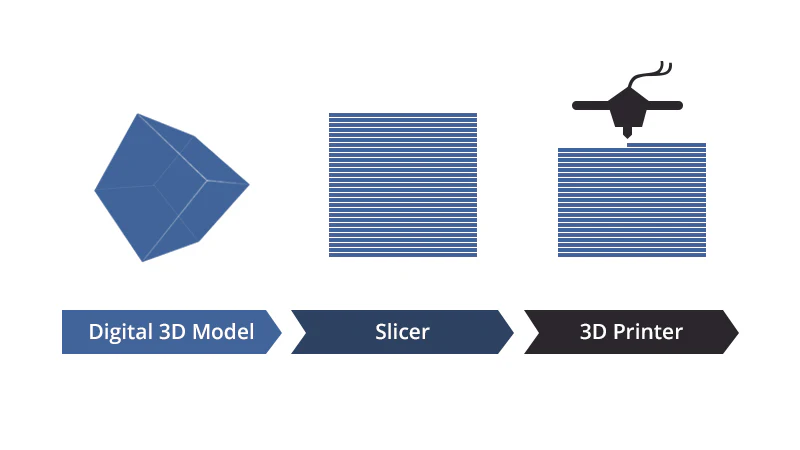
In the resin 3D printing workflow, slicer software does far more than simply slice a model into layers. This often-overlooked tool is the critical factor determining print success rates, surface quality, support removability, and material efficiency.
Unlike Fused Deposition Modeling (FDM), resin printing places much stricter demands on the slicer. Because resin curing is an instantaneous physical reaction, any deviation in parameters—exposure time, lift speed, or peel force—can lead to catastrophic failure, deformation, or surface defects.
While the market includes expensive professional tools (such as Formware or PreForm), there are numerous powerful free alternatives that are often underestimated. These free tools not only excel in core functions like support generation and model repair but also demonstrate unique vitality through community-driven innovation and rapid hardware adaptation.
This report provides a systematic evaluation of ten representative free slicers for resin printing. We analyze them based on support generation algorithms, user interface (UI), hardware compatibility, community activity, and processing stability to provide a scientific selection guide for professional users, design studios, and enthusiasts.
Core Evaluation Criteria for Resin Slicers
Unlike FDM slicers, resin printing tools must be evaluated on specific dimensions:
Intelligent Support Generation
Improper supports account for over 50% of resin print failures. An excellent algorithm must automatically identify overhangs, place support points precisely, adaptively adjust support density and strength, and optimize the contact point (tip) to minimize scarring on the final part.
Smart Parameter Matching
Different printer models, resin types, and geometries require vastly different exposure times and pre-processing settings. A top-tier slicer should offer a rich library of pre-set resin profiles and automatically recommend optimal parameter combinations.
Model Repair and Pre-processing
Resin printing often requires hollowing (to save material), adding drain holes (to prevent suction cups), and mesh repair (to close holes). The completeness of these features directly impacts success rates and cost.
Hardware & Format Compatibility
With a wide variety of file formats (.ctb, .goo, .sl1, .photon, etc.), a highly compatible slicer allows users to support multiple machines without changing software workflows.
Performance and Stability
Slicing large, high-resolution models can take minutes. Stability during processing and background batch processing capabilities are crucial for user experience.
Community and Documentation
An active user community and clear documentation significantly reduce the learning curve and help with troubleshooting.
The Top 8 Free Resin Slicer Software
1. HeyGears Blueprint Studio
HeyGears Blueprint Studio (BPS) represents the cutting edge of resin slicing technology. Users can simply select the printer model, material, and part complexity, and the system utilizes intelligent process algorithms and pre-validated data to automatically apply the optimal exposure strategy, support scheme, and orientation.
Its support algorithm uses physics-based simulation to dynamically adjust support density and tip shape based on the surface area and thickness of overhangs. Compared to traditional uniform support generation, this reduces support failure rates by over 87%. BPS integrates deeply with the HeyGears Reflex hardware series, enabling advanced optical uniformity algorithms, which ensures uniform curing even at the edges of large build plates.
Pros: Professional-grade AI automation, complete toolset (hollowing/drain holes), and excellent surface quality on native hardware.
Cons: Native support is primarily for the HeyGears ecosystem (though export options exist).
Best For: Professionals and studios using or planning to use HeyGears equipment.
2. Chitubox Basic
Chitubox is arguably the most widely used resin slicer globally. Its success lies in the perfect balance of ease of use and functionality. The interface is intuitive, allowing beginners to start printing with almost zero learning curve.
Chitubox’s automatic support algorithm is the industry benchmark. It intelligently places supports based on surface normals and overhang angles. Crucially, it offers powerful manual editing capabilities, allowing users to add, move, or delete individual supports. It also includes essential tools for hollowing, drain hole generation, and mesh repair.
Pros: Massive hardware compatibility (supports hundreds of printers), reliable automatic supports, and “plug-and-play” ease of use. Cons: Slicing large complex models can be slow; advanced features are locked behind the “Pro” subscription. Best For: Beginners, hobbyists, and general users with third-party printers.
3. Lychee Slicer (Free Edition)
Lychee Slicer has surged in popularity due to its modern, user-friendly interface and innovative features. Even the free “Lite” version is robust enough for most users. Its standout feature is the Magic Menu, which automates orientation, support, and bracing in one click.
Lychee is unique for its Community Resin Profiles—a cloud-based library where users share verified settings for thousands of printer/resin combinations, drastically reducing trial and error. The visualization of “islands” (unsupported areas) is excellent, helping users spot failures before printing.
Pros: Beautiful, modern UI; vast cloud library of resin profiles; excellent failure detection. Cons: The free version includes ads; some advanced editing tools require a subscription. Best For: Users who value a modern workflow and community-sourced settings.
4. VoxelDance Tango (Free Version)
VoxelDance Tango is a rising star known for its industrial-grade algorithms. While it has a paid tier, the free version offers access to its “Smart Support” technology. Unlike static supports, VoxelDance uses an algorithm that strengthens supports at critical stress points while lightening them in non-critical areas to save material.
It is highly optimized for DLP/LCD printing and offers extremely fast slicing speeds. It is compatible with most major printer brands (Elegoo, Anycubic, Phrozen, etc.).
Pros: Industrial-grade support algorithms, fast processing, clean interface. Cons: The free version limits some of the more advanced automated repair scripts. Best For: Users looking for industrial-level support generation in a free package.
5. Anycubic Photon Workshop
As the official software for the Anycubic Photon series, this tool offers an unmatched out-of-the-box experience for Anycubic owners. All resin parameters and machine settings are pre-tuned by the manufacturer.
Recent updates have added Adaptive Support capabilities and real-time slice previewing. While it lacks some of the advanced editing features of Lychee or Chitubox, its stability with Anycubic machines is rock solid.
6. PrusaSlicer
Although originally famous for FDM, PrusaSlicer includes full MSLA (resin) support, originally developed for the Prusa SL1. It is completely open-source and offers arguably the most granular control over printing parameters of any free software.
Its auto-orientation and auto-support algorithms are highly regarded for their efficiency. Because it is open-source, it allows for extensive customization and has no paywalls.
7. UVtools
While not a traditional “slicer” (it doesn’t generate support), UVtools is an essential free open-source companion. It opens sliced files (from Chitubox, Lychee, etc.) and analyzes them for errors that slicers miss, such as resin traps, suction cups, and islands. It can even repair these files at the pixel level.
8. Formware 3D
Formware 3D is a premium, paid software, but its 30-day trial allows users to experience high-end automatic error detection and advanced support strategies (like internal lattice structures) that are rarely found in free tools. It is listed here as a “try-before-you-buy” option for those considering upgrading to a paid workflow.
Selection Guide and Best Practices
- For Beginners: Start with Chitubox Basic or Lychee Slicer (Free). They have the largest communities, meaning if you have a problem, someone on YouTube or Reddit has already solved it.
- For Professionals: If you use HeyGears hardware, Blueprint Studio is non-negotiable. For general professional use, VoxelDance Tango or PrusaSlicer offers the requisite depth of control.
- Final Check: Always run your sliced file through UVtools before printing to catch invisible errors.
Conclusion
The choice of a slicer is not just about software; it is about choosing a workflow. Whether you prioritize HeyGears, the community power of Lychee, or the ubiquity of Chitubox, mastering your chosen tool is the single best investment you can make to improve your print quality.
